How to Redeem GrabOne Coupons
Coupons can only be redeemed via the GrabOne Merchant Portal to trigger payment.
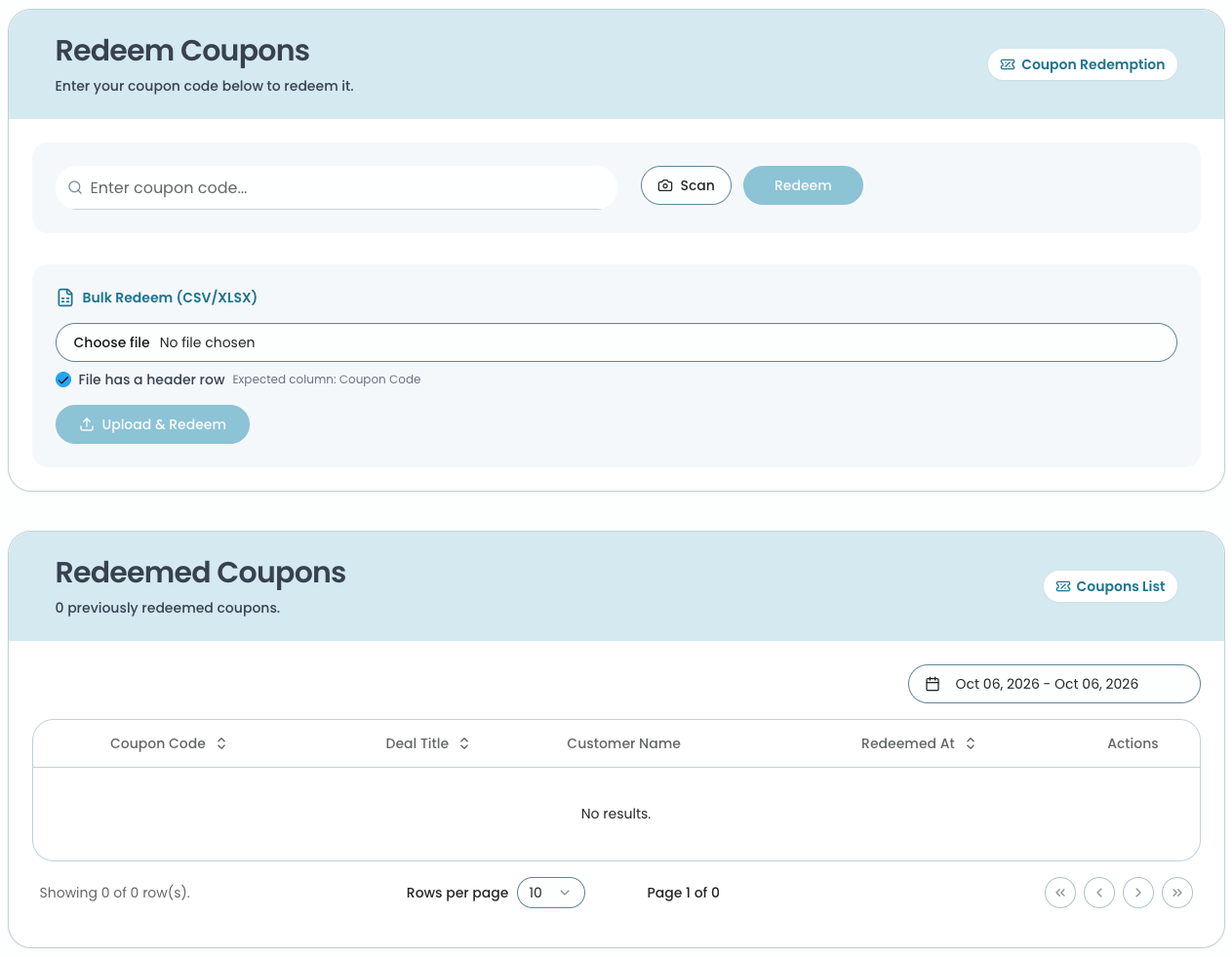
Log in to the GrabOne Merchant Portal and click on the 'Redeem Coupons' tab. You can then redeem a coupon in one of two ways:
Option 1 - Enter the coupon code
Enter the coupon number/code from the top right corner of the coupon
Click Redeem
Option 2 - Scan the coupon
Click Scan - this will open your device's camera
If prompted, allow the Merchant Portal access to your camera
Hold the QR code on the coupon up to the camera
The coupon code will automatically fill in for you
Click Redeem to confirm and redeem the coupon.=
Option 3 - Bulk redeem multiple coupons
Create a CSV or XLSX file with all the coupon codes listed in one column
If your file has a header row, the header must be named Coupon Code
In the 'Bulk Redeem (CSV/XLSX)' section, click 'Choose file' and select your file
Tick 'File has a header row' if your file includes the 'Coupon Code' header. If your file only contains coupon codes with no header, untick this box
Click Upload & Redeem
Once redeemed, the coupon will appear in the 'Redeemed Coupons' list below.