
Uploading tracking information for Store orders
Once a GrabOne Store order has been dispatched, you'll need to upload tracking information via the GrabOne Merchant Portal so your customer can follow their delivery.
Tracking should be uploaded as soon as the order has been dispatched. Once uploaded, the customer will receive their tracking details via email and can also locate them under My Purchases in their GrabOne account.
Please note: GrabOne only supports bulk tracking uploads via CSV file. Individual tracking uploads are not available.
How to upload tracking
Log in to the GrabOne Merchant Portal
Go to Deal Purchases
Select Update Tracking
Upload your CSV file with the relevant tracking information, using the format shown below:
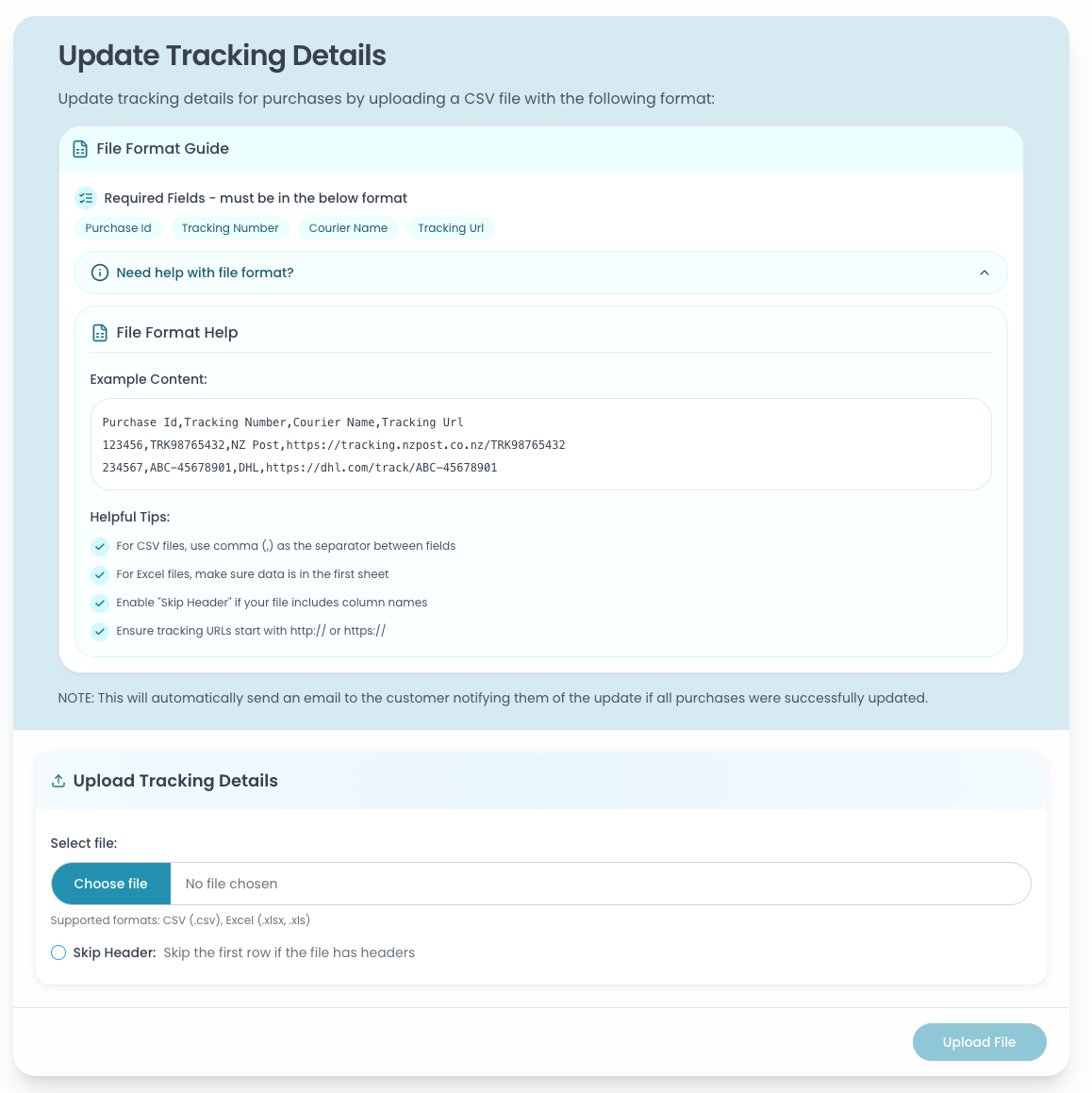
Once tracking has been uploaded, an automatic email will be sent to the customer with their tracking details.
Please make sure all tracking information is correct before uploading - incorrect or incomplete tracking details can cause confusion for customers and may result in delays resolving any delivery issues.
Haven't dispatched yet?
All Store orders should be dispatched within the timeframe advertised on the deal page. If you're experiencing a delay, please contact us at partner.support@grabone.co.nz as soon as possible.
Need help?
Contact us at partner.support@grabone.co.nz and we'll get back to you as soon as we can.