
GrabOne Statements
Looking for confirmation of your recent GrabOne payment? You can find record of this in GrabOne Merchant Portal under Statements.
Scroll down the page until you land at Statements Summary:
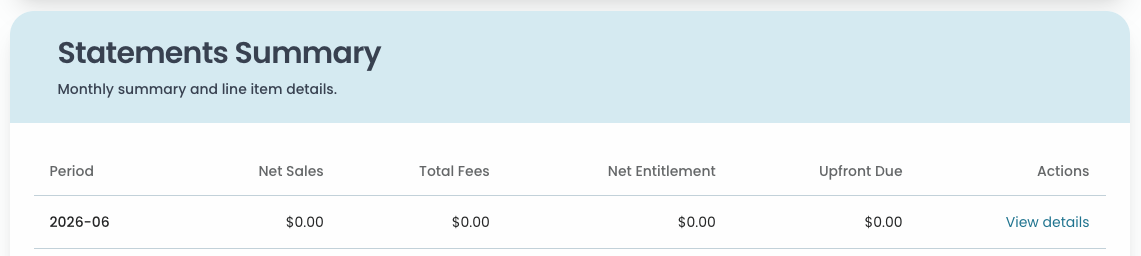
The Statements Summary gives you a monthly overview of your sales and payments at a glance. Here's what each column means:
Period - the month the sales occurred (e.g. 2026-06 = June 2026)
Net Sales - the total value of vouchers sold that month
Total Fees - GrabOne's commission deducted from your sales
Net Entitlement - what remains after fees have been deducted
Upfront Due - the amount being paid out to you for this period
Click View Details to see a breakdown of your deals and payments - including purchase and coupon numbers for your reference.
You can also Export PDF to download or print the statement.
Understanding your GrabOne Statement
Your statement gives you a full picture of your sales activity and what you've been paid for a given period.
Your statement may look slightly different depending on your deal type.
POR (Pay on Redemption) - your full net entitlement is paid out upfront, so your Upfront Due will match your Net Entitlement
RET (Retention) - a portion of your entitlement is held back and paid out once the coupon has been redeemed or at expiry. You'll see two extra fields in your statement:
Held Back - the amount being withheld this period
Retention - shown as a column in both the Settlement Period Summary and Line Items, so you can see exactly how much is being held per deal and per purchase
If you're unsure which deal type applies to you, this will be listed in the Type column of your Settlement Period Summary.
Statements are broken down into a few key sections - here's what to look for and what each part tells you:
Summary section
Net Sales - total value of vouchers sold
Total Fees - GrabOne's commission deducted
Net Entitlement - what's left after fees
Upfront Due - the amount paid out this period
Held Back (RET deals only) - the portion being withheld for later payment
Settlement Period Summary
Lists each active deal with its Deal ID, title, type, and payment amounts. If you have a RET deal, you'll also see a Retention column showing how much is being held back per deal.
Line Items
A full breakdown of every individual purchase within each deal, including:
Coupon number and purchase date
Option selected (e.g. number of sessions, location, or date)
Net sales value, upfront amount, and line total
Retention (RET deals only) - the held back amount per purchase
Export PDF
Click Export PDF at the top of your statement to download or print it for your records.
Something doesn't look right?
If your statement doesn't match what you're expecting - or you have questions about a specific payment or line item - get in touch with our Partner Support team via email partner.support@grabone.co.nz, and we'll help sort it out.